
Context Engineering: Why Your AI Agent Is Only as Smart as Its Context
Learn context engineering — the skill replacing prompt engineering for AI agents. Covers context optimization, memory, RAG, and AWS Bedrock AgentCore.

Let’s be real — if prompt engineering is still the most advanced concept in your AI toolkit, you’re playing last year’s game. The shift to context engineering is already happening, and it’s changing how production AI systems are built from the ground up. Back when Large Language Models (LLMs) first hit the scene, writing the perfect prompt felt like a superpower. And honestly, for the basic chatbots of 2022, it was enough.
But the field moved fast. By 2023, Retrieval-Augmented Generation (RAG) changed the conversation entirely — suddenly we were pulling in domain-specific knowledge and feeding it straight to the model. Fast forward to today, and we’re building tool-using, memory-enabled agents that hold context across sessions, make decisions, and evolve over time. A single well-crafted prompt? That barely scratches the surface anymore.
Here’s the problem with scaling up the old way: when you just keep packing more information into a prompt, things start breaking — quietly at first, then catastrophically.
The first issue is context decay. The longer and messier your context gets, the more the model struggles to stay grounded. It starts hallucinating. It loses track of what matters. Research has shown that model accuracy can drop sharply once context exceeds around 32,000 tokens — a fraction of those headline-grabbing 2-million-token windows that vendors love to advertise.
The second issue is purely practical. The context window — think of it as the model’s short-term memory — has hard limits. Even when those limits are generous, every additional token costs you money and speed. I learned this the hard way. I once built a pipeline where I crammed everything into the context: research papers, style guidelines, worked examples, review notes — all of it. The outcome? A single run took over 30 minutes. Completely unusable. That brute-force approach — sometimes called “context-augmented generation” — might look clever on paper, but it falls apart the moment it hits production.
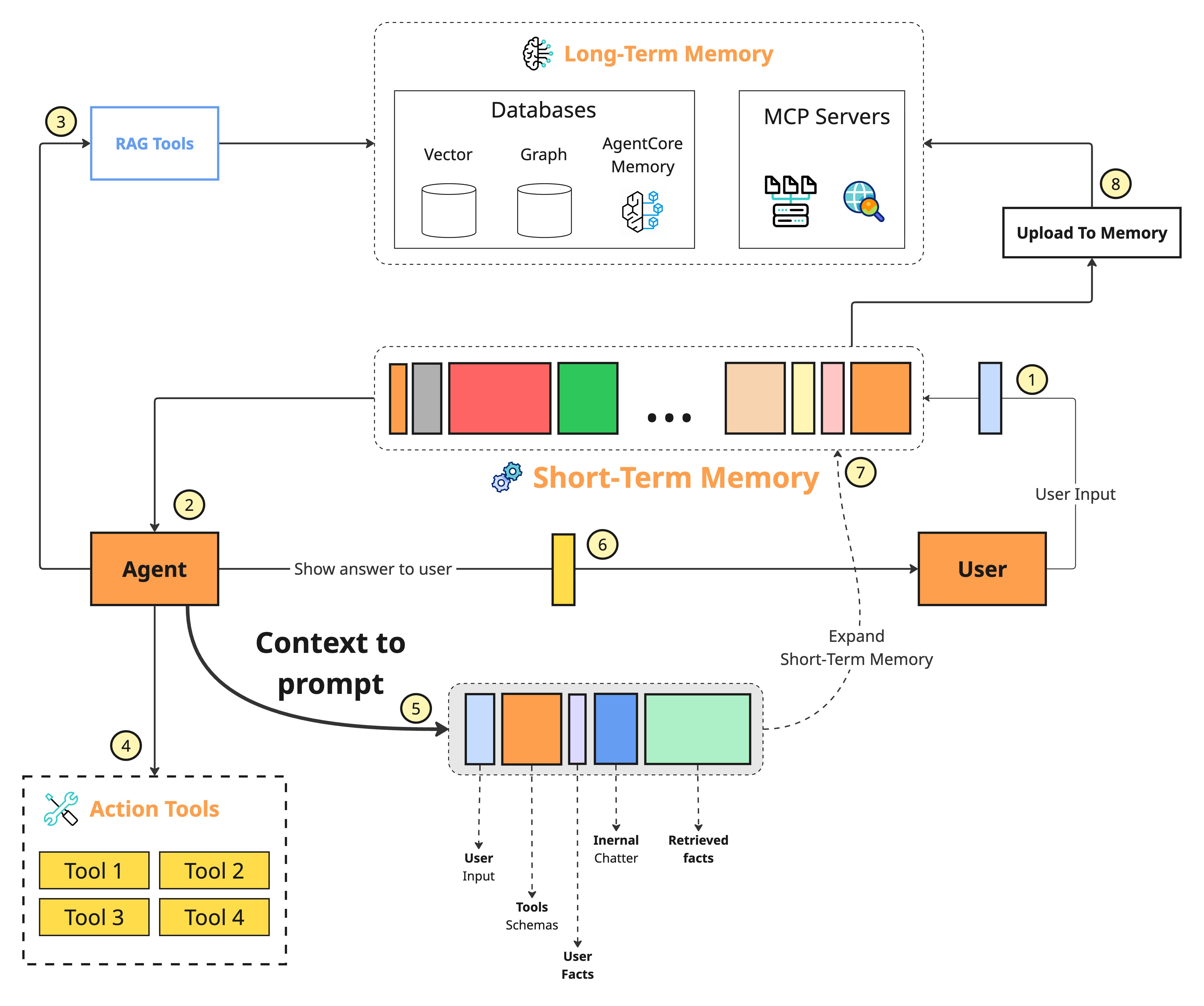
So what's the alternative? Context engineering. It's a fundamentally different way of thinking. Instead of obsessing over how to word a single prompt, you're designing the entire information environment around the model. You dynamically pull in what's needed — from memory stores, databases, APIs, tools — and filter out everything that isn't.
The model only sees what's relevant to the task right in front of it. The result is faster execution, sharper accuracy, and dramatically lower costs.
Support My Content
Consider supporting me and my content by leaving a like and following me on Substack, Medium, and LinkedIn
Understanding Context Engineering
So what actually is context engineering? If you want the textbook answer, it’s an optimization problem — you’re searching for the best combination of functions to assemble a context that maximizes the quality of what the LLM produces for any given task.
In plain terms, it’s the discipline of strategically filling the model’s limited context window with the right information, at the right time, in the right format. You pull in exactly what’s needed from short-term and long-term memory to solve the task at hand — nothing more, nothing less. The goal is precision, not volume.
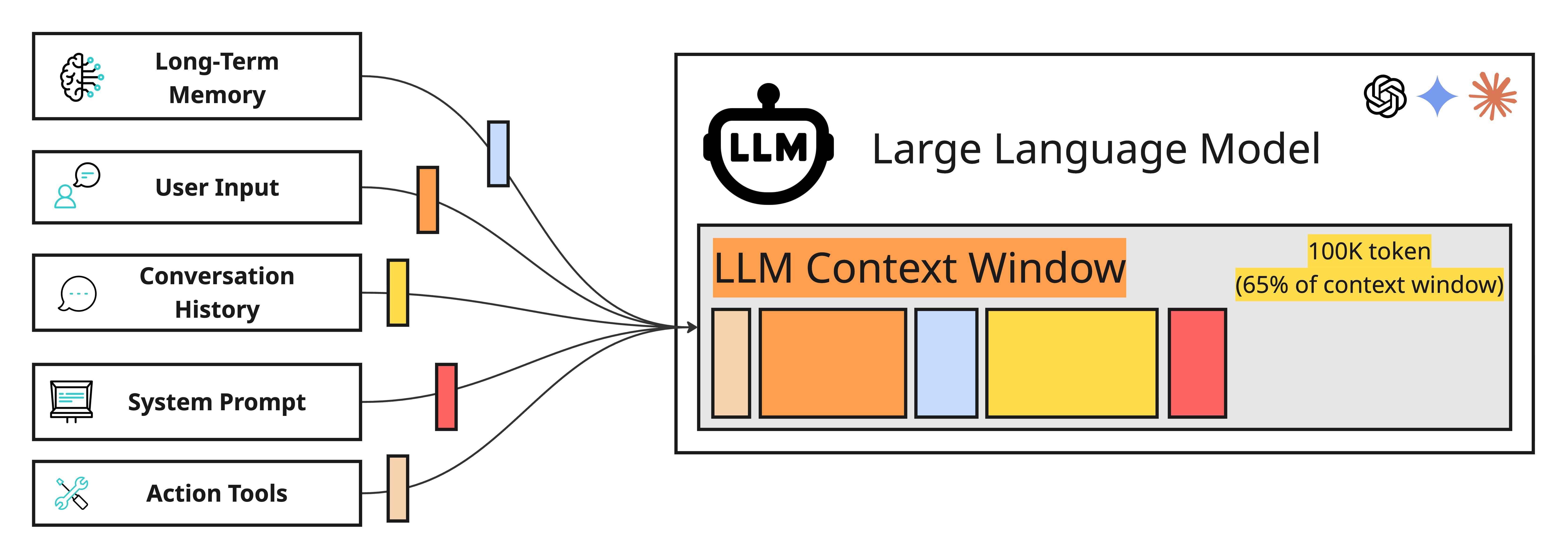
Andrej Karpathy framed this beautifully: think of LLMs as a new kind of operating system. The model itself is the CPU. The context window is the RAM. And just like an operating system carefully manages what gets loaded into RAM at any given moment, context engineering is the art of curating what occupies the model’s working memory. One critical nuance here — context is a subset of the system’s total memory. You can store information elsewhere and only surface it when the model actually needs it. Not every piece of data belongs in every call.
Now, this doesn’t mean prompt engineering is dead. Far from it. Context engineering doesn’t replace prompt engineering — it absorbs it. Writing clear, effective prompts is still a core skill, but it’s now just one piece of a much larger puzzle. You still need to know how to talk to the model. But you also need to know what to put in front of it, when to put it there, and how to structure it so the model doesn’t choke. That’s the full picture. That’s context engineering.
LLM Context Components
The context you hand to an LLM isn’t some fixed block of text you write once and forget about. It’s a living payload — dynamically assembled fresh for every single interaction. Behind the scenes, multiple memory systems work together to construct it, each one serving a distinct purpose rooted in how human cognition actually works.
Let’s break down the core building blocks:
System Prompt — This is where your agent gets its identity. Core instructions, behavioral rules, guardrails, persona definitions — it all lives here. In cognitive terms, this is procedural memory: the deep-seated knowledge of how to operate.
Message History — The running thread of conversation. User inputs, assistant responses, internal reasoning chains, tool calls and their results — all of it captured in sequence. This functions as the agent’s short-term working memory, giving it awareness of what just happened and what’s currently in play.
User Preferences and Past Experiences — This is where personalization lives. Stored facts about the user, prior interactions, behavioral patterns — typically held in a vector or graph database and retrieved when relevant. Cognitively, this maps to episodic memory: the ability to recall specific events and experiences. It's what lets your agent remember that you're a backend engineer who prefers concise answers, or that you asked about deployment pipelines last Tuesday.
Retrieved Information — The factual backbone. Domain-specific knowledge pulled from internal sources like company wikis, documentation, and databases, or from external sources through real-time API calls. This is semantic memory — structured world knowledge — and it's the engine behind RAG.
Tool and Structured Output Schemas — Often overlooked, but these are just as much a part of context as any retrieved document. They define what the agent can do and how it should format its responses. This is another layer of procedural memory — the agent's understanding of its own capabilities and constraints.
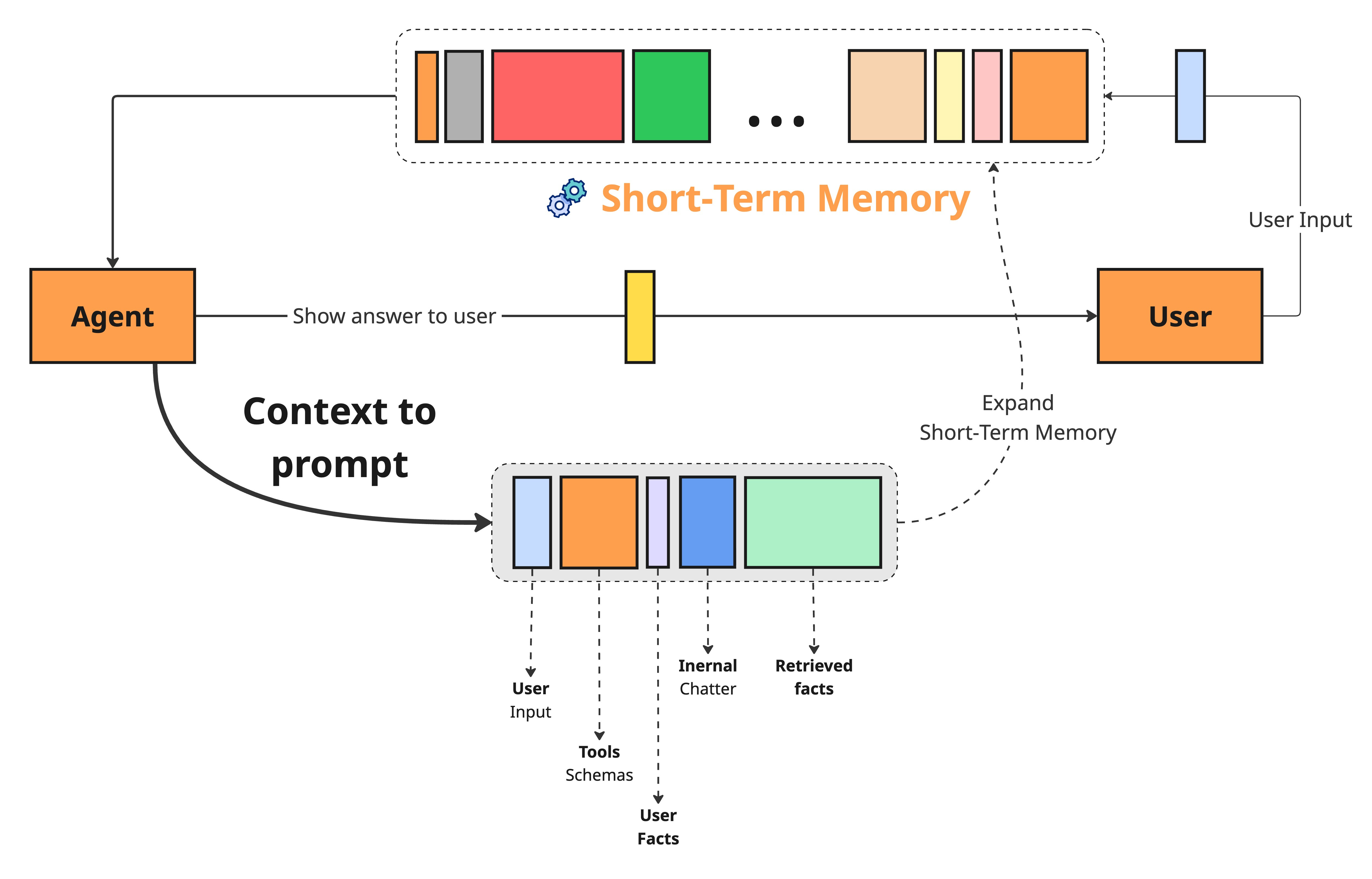
None of these components exist in isolation. The flow is cyclical and constantly in motion. When a user query or task comes in, it triggers retrieval across long-term memory sources — episodic, semantic, and procedural. This is the agentic RAG layer of your system, actively deciding what’s worth pulling in.
From there, retrieved information merges with short-term working memory, tool schemas, and output format definitions to form the complete context payload that gets sent to the model. Once the LLM responds, working memory updates with the new interaction. And when something important surfaces — a user preference, a key decision, a corrected fact — it gets written back into long-term memory, making the entire system sharper for next time.
Implementation Challenges
Building a solid context engineering pipeline sounds great in theory. In practice, it’s where things get messy. Production systems surface a set of hard, recurring problems — and if you don’t tackle them head-on, they’ll quietly erode everything your agent is supposed to do well.
The Context Window Bottleneck
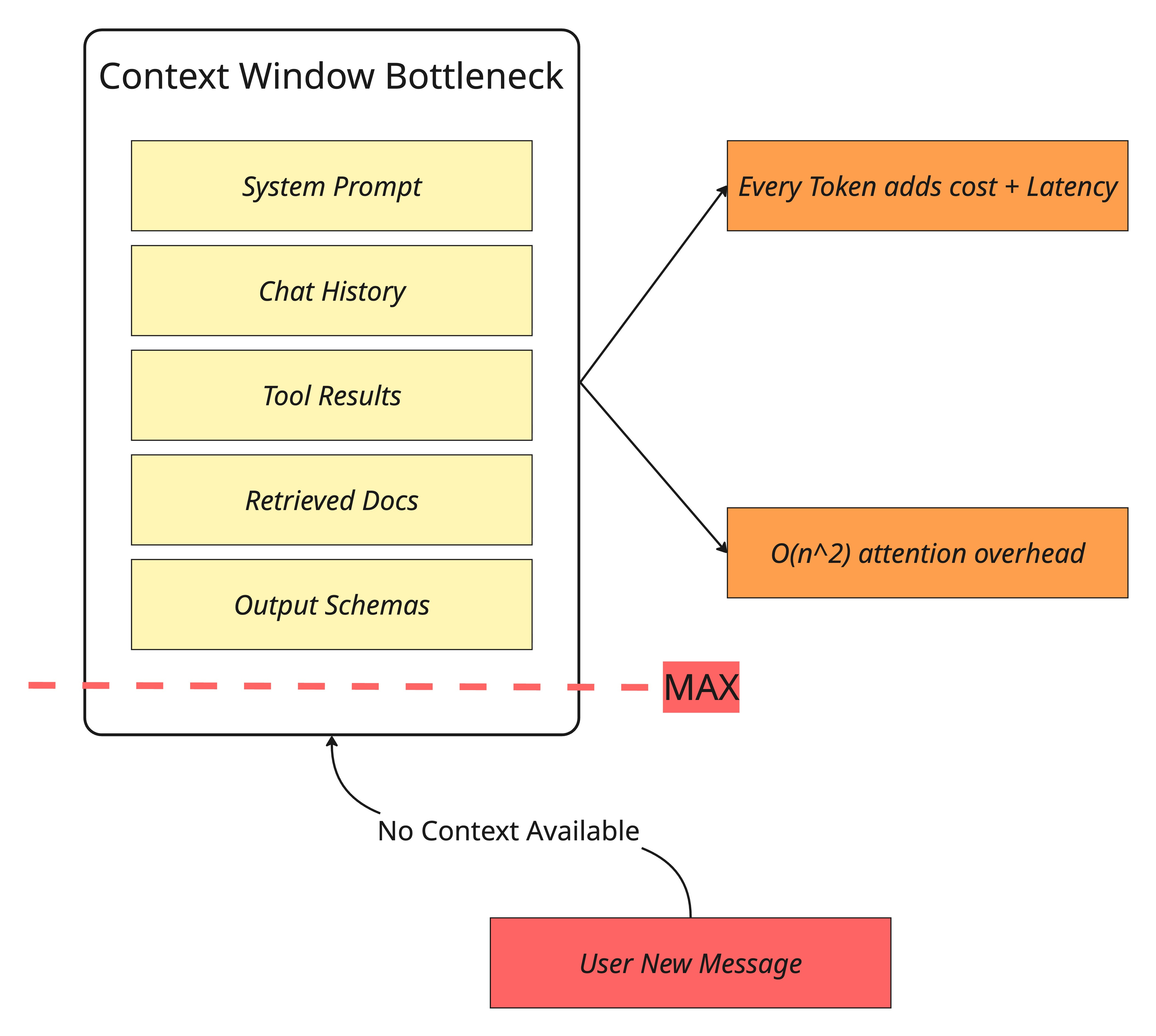
Even the largest context windows are still finite — and they’re expensive to fill. Under the hood, the self-attention mechanism that powers LLMs carries quadratic computational and memory overhead.
That means every token you add doesn’t just take up space — it increases cost and latency in a compounding way. Now consider what a typical agent interaction looks like: chat history, tool call results, retrieved documents, system instructions, output schemas. It adds up fast, and you hit the ceiling sooner than you’d expect.
The context window isn’t just a technical spec — it’s a budget, and most teams blow through it without realizing.
Information Overload and the “Lost in the Middle” Problem
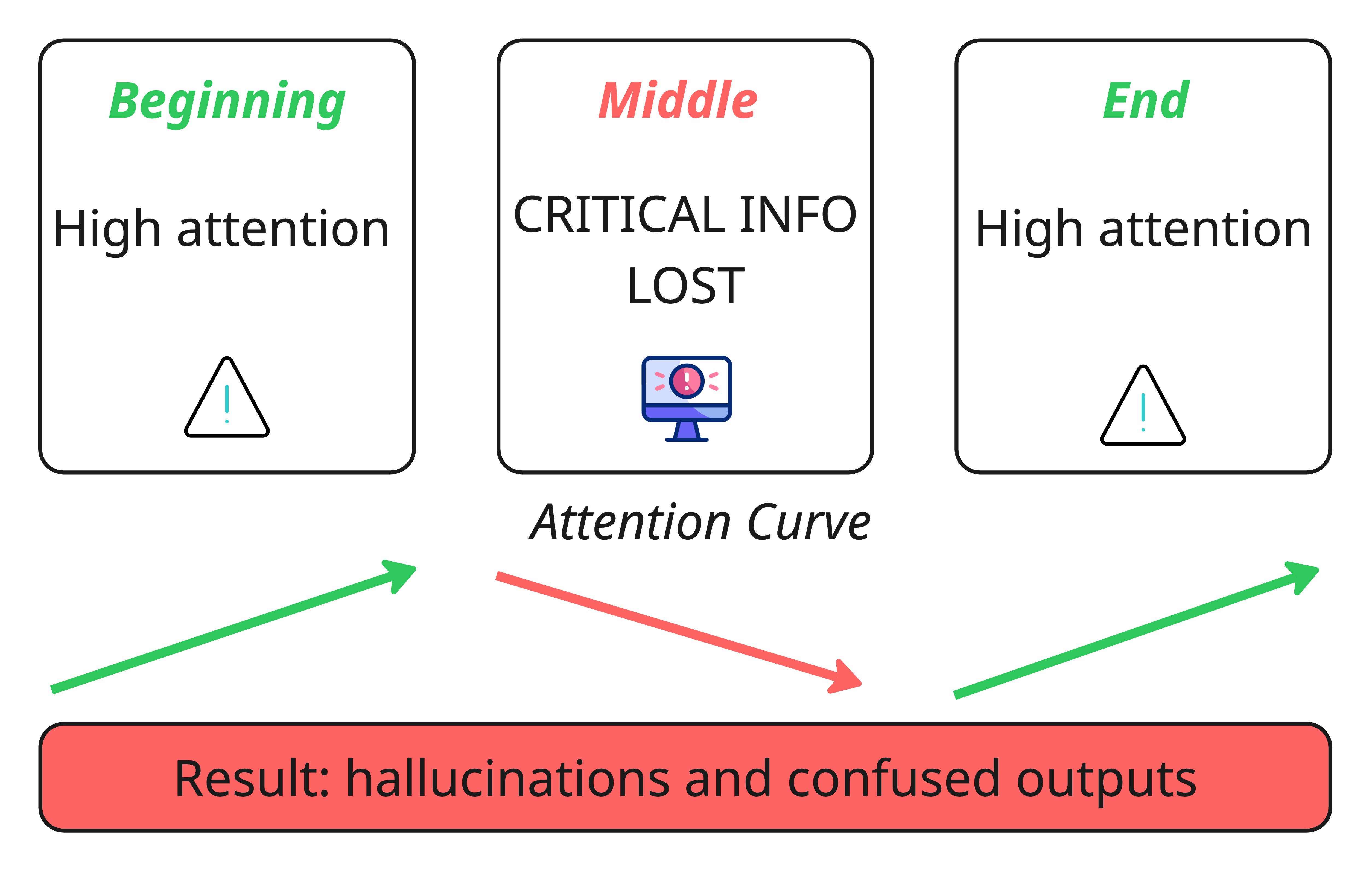
Here’s the cruel irony of big context windows: the more you put in, the worse the model gets at using it. This is context decay in action. Research has consistently shown that as context length grows, models lose their grip on the details that actually matter. Critical information buried in the middle of a long context gets overlooked — a phenomenon researchers have specifically dubbed the “lost-in-the-middle” effect.
The result isn’t just slightly worse answers. It’s confused, irrelevant, or completely fabricated ones. When the model senses gaps it can’t resolve, it fills them in on its own. That’s where hallucinations come from.
Context Drift
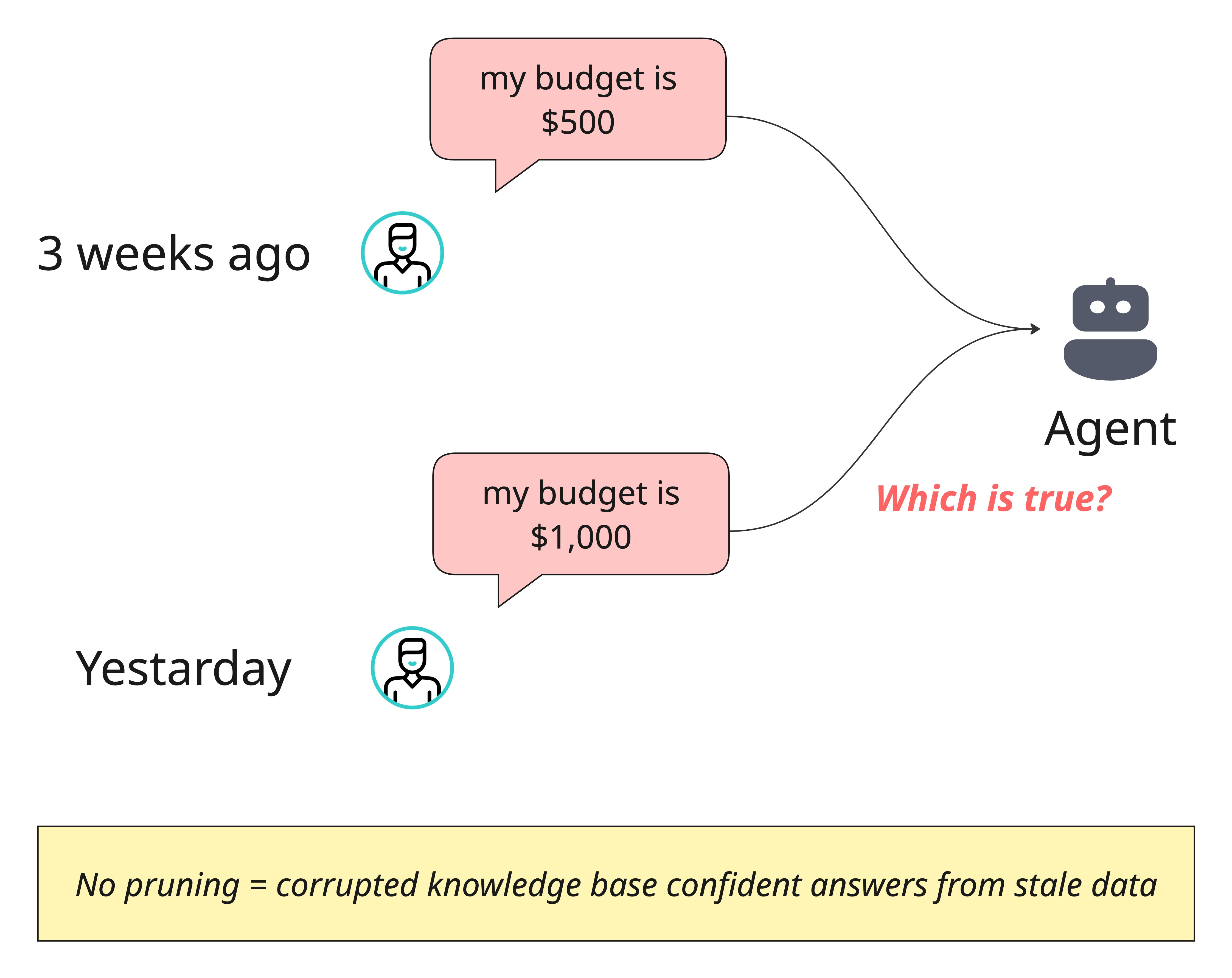
This one is sneaky. Over time, conflicting pieces of information pile up in your agent’s memory — and without active management, the model has no way to know which version is true.
Imagine your agent stored:
“The user’s budget is $500” three weeks ago
yesterday the user updated it to “$1,000”.
If both facts sit in memory with no resolution mechanism, the agent is essentially working with a corrupted knowledge base. It might confidently give an answer grounded in outdated information, and the user will have no idea why.
Tool Confusion
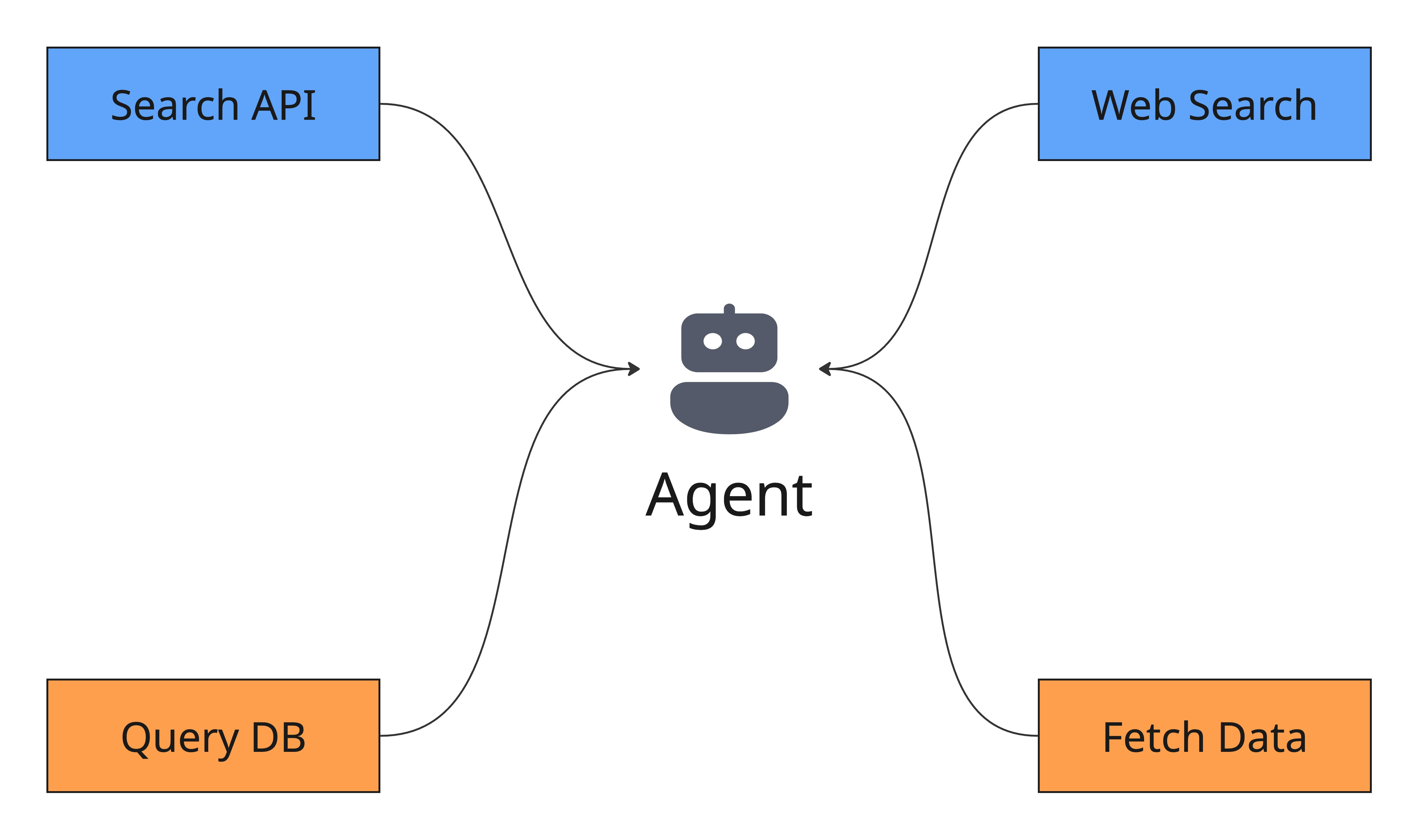
This problem catches a lot of teams off guard. You give your agent access to a dozen tools, thinking it makes the system more capable — but the opposite often happens. When tool descriptions are vague, overlap with each other, or there are simply too many options, the agent freezes up or picks the wrong one entirely. The Gorilla benchmark put numbers to this: nearly every model tested showed degraded performance once more than a single tool was introduced.
More tools doesn't mean more power. Without careful curation and crystal-clear descriptions, it means more ways to fail.
Context Optimization Techniques
Back when RAG was the cutting edge, managing context was relatively straightforward — retrieve some documents, stuff them into the prompt, and let the model figure it out. Those days are gone. Modern agents pull from multiple data sources, orchestrate tools, and maintain layered memory systems. That complexity demands a deliberate, strategic approach to what goes into the context window and how it’s structured.
The good news is you don’t have to solve every piece of this puzzle from scratch. Some optimizations are architectural decisions you make as a developer. Others are infrastructure problems that managed platforms like AWS Bedrock AgentCore can handle for you. Let’s break it down.
These are the design decisions that no platform can make for you — they require understanding your specific use case, your data, and how your agent thinks.
Selecting the Right Context
This is the foundational principle, and it’s deceptively simple: don’t give the model everything — give it only what matters. The instinct to dump all available information into the prompt is strong, but it’s the fastest path to degraded performance.
Use RAG paired with a reranking layer to surface only the most relevant facts for a given query. Go a step further with structured outputs — have the model break its reasoning into logical segments so that only the necessary pieces flow downstream to the next step.
This is what dynamic context optimization looks like in practice: actively filtering, scoring, and selecting information to maximize signal density within a finite window.
How can AWS BedRock help you optimize this stage?
AWS BedRock offers multiple ways to optimize your context, which include two main features:
AWS BedRock Prompt Optimization
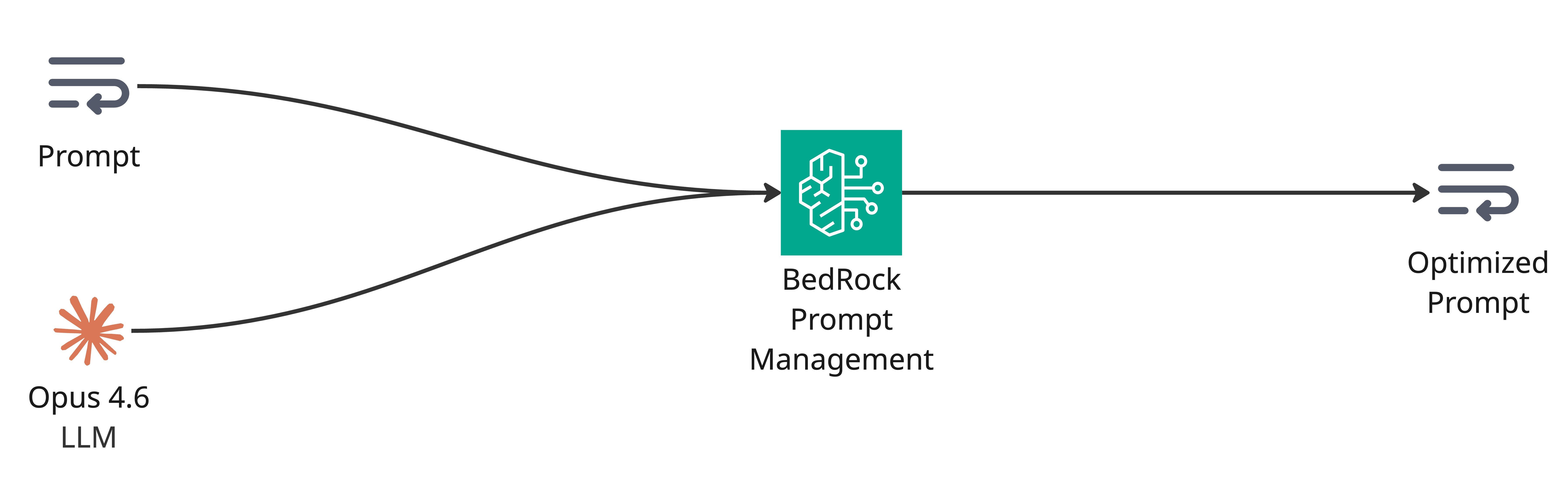
Amazon Bedrock offers a tool to optimize prompts. Optimization rewrites prompts to yield inference results that are more suitable for your use case. You can choose the model that you want to optimize the prompt for and then generate a revised prompt.
After you submit a prompt to optimize, Amazon Bedrock analyzes the components of the prompt. If the analysis is successful, it then rewrites the prompt. You can then copy and use the text of the optimized prompt.
AWS BedRock Knowledge Base
To select the right context, you have to build a solid RAG pipeline. Building a RAG pipeline is a complicated task that contains a lot of flaws and errors.
Amazon Bedrock Knowledge Bases is a fully managed RAG capability with built-in session context management and source attribution that helps you implement the entire RAG workflow — from ingestion to retrieval and prompt augmentation — without building custom integrations to data sources or managing data flows.

AgentCore Gateway
Dumping every available tool into your prompt might seem like the safe bet — after all, you want the agent to have options. But as your tool catalog grows, so does your context payload and the token bill that comes with it. Worse, as we covered in the challenges section, more tools mean more confusion for the model.
AgentCore Gateway transforms existing APIs, databases, and services into MCP-compatible tools that any agent can use AWS, acting as a centralized proxy for your entire tool ecosystem. But the real value for context engineering is its support for semantic tool search. In a traditional setup, you bind every tool definition to the model on every call — regardless of whether the current query needs one tool or twenty. With semantic search, the Gateway dynamically selects only the tools relevant to the task at hand and includes just those in the prompt. The rest never touch the context window.
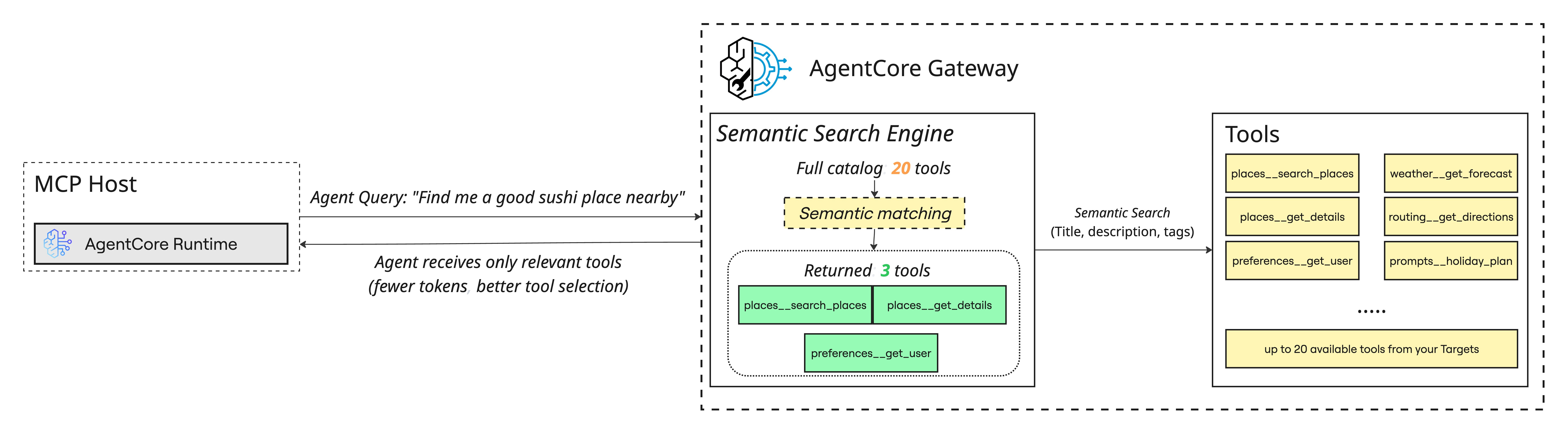
The impact is twofold. Your context stays lean and focused, which means lower cost per call and less risk of tool confusion. And your agent actually performs better, because it’s choosing from three relevant tools instead of drowning in thirty irrelevant ones. This is context selection applied to your tool layer — same principle, different surface area.
Context Compression
Long-running conversations are a ticking time bomb for your context window. Every turn adds tokens, and eventually something has to give. The solution is compression — think of it like memory management on your operating system. You don’t keep every process loaded into RAM forever.
In practice, this means summarizing older conversation turns using an LLM, extracting key facts and committing them to long-term episodic memory through tools like mem0, or applying deduplication techniques such as MinHash to strip out redundant information. The goal is preserving meaning while reclaiming space.
How can AWS BedRock “AgentCore” help you optimize this stage?
Compression is one of the most powerful strategies for managing your context window. There are two primary approaches worth understanding:
Compression by Summary — Summarizing older conversation turns lets you collapse tens of messages into a few concise lines. In practice, this means you keep only the most recent messages (typically the last 5–6 turns) in full detail while the rest of the conversation history gets condensed into a summary. The model still has the broader context — it just takes up a fraction of the tokens.
Compression by Semantic Extraction — Summarization works well, but summaries lose detail by design. Some facts are too important to risk losing — a user’s stated budget, a critical decision, a corrected preference. Semantic memory solves this by extracting and storing specific facts that are relevant to the current query. When the LLM needs deeper information on a particular topic, it can fetch semantically similar facts from this memory layer without loading the entire conversation history.
AgentCore Memory provides long-term memory strategies out of the box — including Session Summaries that create condensed representations of interaction content, and Semantic Facts that maintain knowledge of domain-specific information and their relationships AWS.
You can also build your own custom strategies. All of this — fact extraction, summarization, preference tracking — happens automatically in the background without you managing any of the underlying infrastructure.
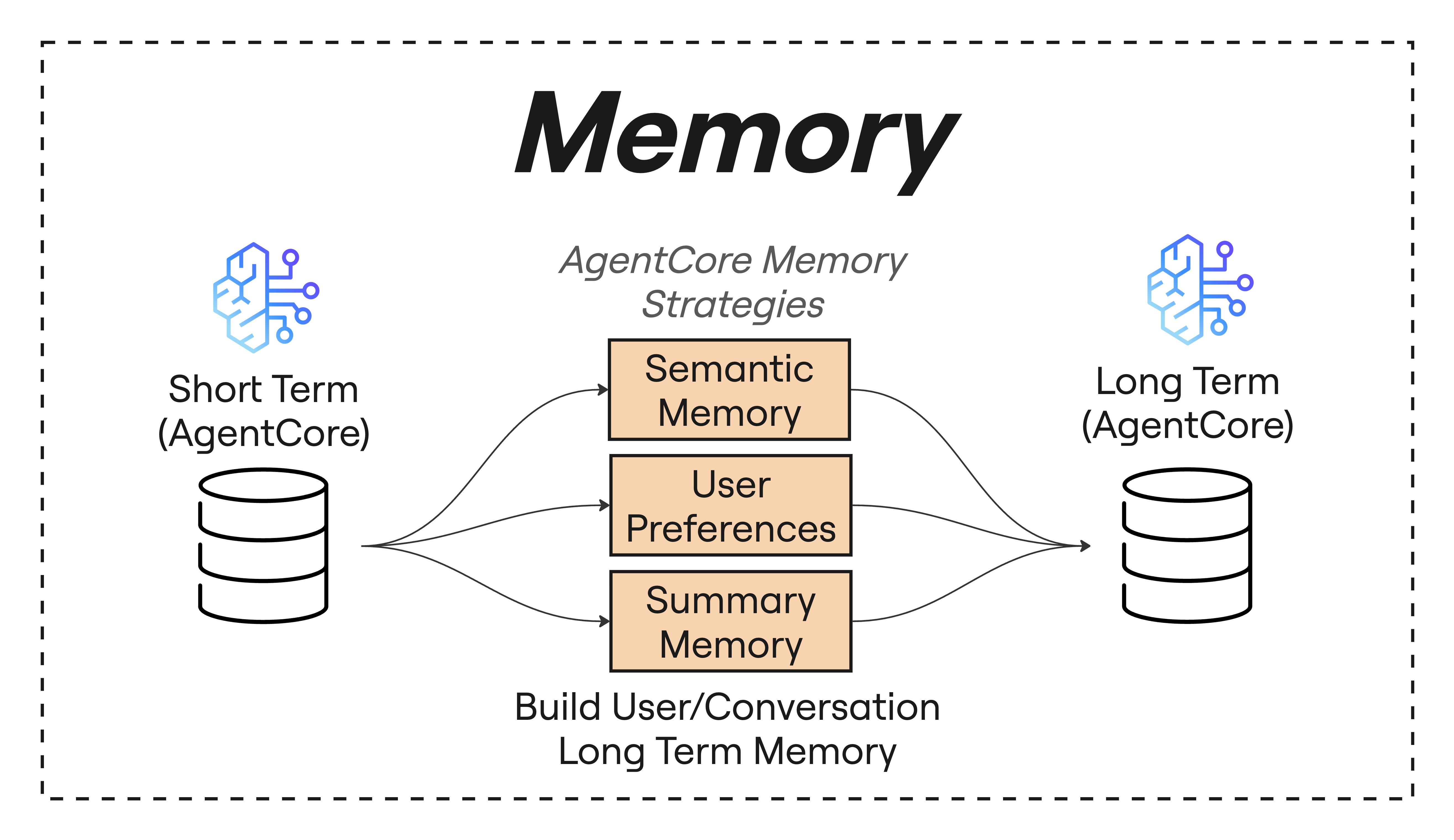
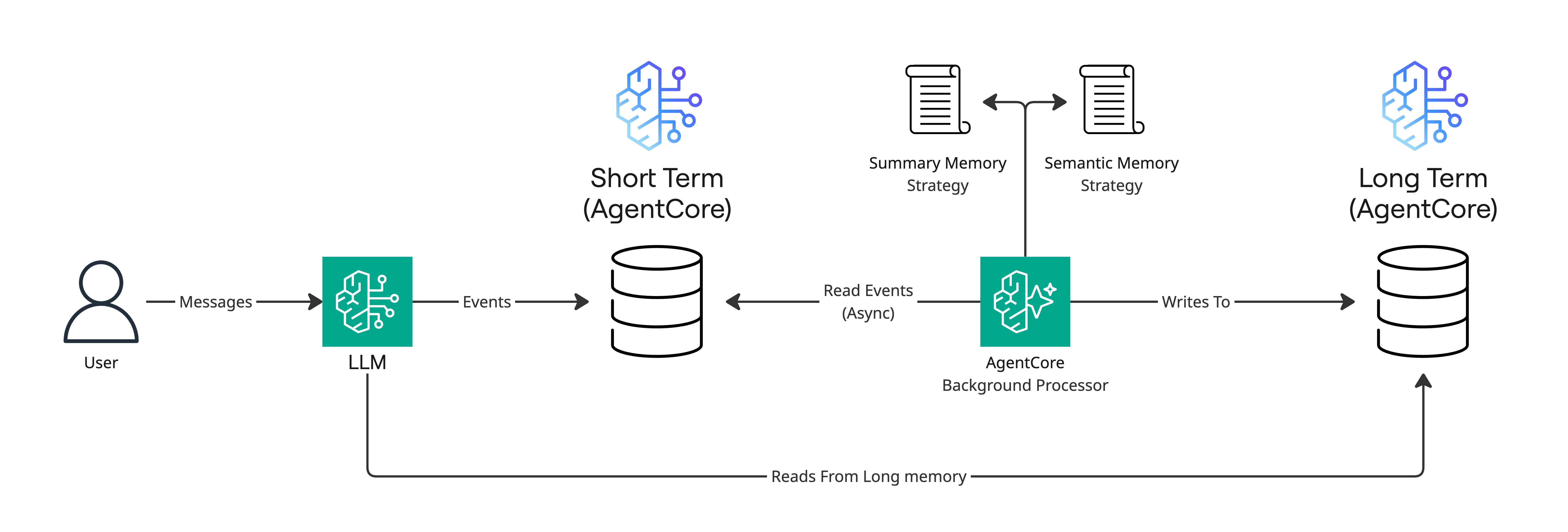
The way it works: long-term memory generation is an asynchronous process that runs in the background, automatically extracting insights after raw conversation data is stored in short-term memory AWS. Your short-term memory captures the raw conversation messages, and AgentCore's strategies process them into structured long-term memory using your configured extraction rules. The full behavior is illustrated in the following diagram.
Context ordering
Where you place information inside the context matters more than most people realize. LLMs have a well-documented attention bias — they focus heavily on what appears at the beginning and end of a prompt, while content in the middle tends to fade into a blind spot. This is the “lost-in-the-middle” effect in action.
The tactical response is straightforward: anchor your most critical instructions at the top and place the freshest, most task-relevant data at the bottom. In between, use reranking to sort by relevance and temporal recency so that nothing essential gets buried. For personalization-heavy applications, dynamic context prioritization takes this further — adapting the ordering based on evolving user preferences and resolving ambiguities on the fly.
Isolating context
Sometimes the best way to manage a complex context isn’t compression or reranking — it’s separation. Instead of forcing one agent to juggle everything, split the problem across multiple specialized agents, each maintaining its own focused context window.
This is the backbone of multi-agent architectures, and it’s really just the separation of concerns principle borrowed straight from software engineering. One agent handles retrieval, another handles reasoning, another handles output formatting. No single context window gets overloaded, and each agent can be optimized independently for its specific job.
Format Optimization
The last lever teams frequently overlook: how the context is formatted. Wrapping different information types in structured markup — XML tags, YAML blocks — makes it significantly easier for the model to parse and reason over the input. Clear boundaries between instructions, retrieved data, and conversation history reduce ambiguity and improve output reliability.
One practical tip worth highlighting: when you need a structured data format inside your prompt, reach for YAML over JSON. YAML carries roughly 66% less token overhead for the same information, which adds up fast when you’re operating under tight context budgets.
How can AWS Bedrock help you optimize at this stage?
As for how this actually works — the core idea is that LLMs process text as a flat stream of tokens. When you dump instructions, data, and conversation history into a prompt without clear structure, the model has to figure out on its own where one type of information ends and another begins. That’s where errors creep in.
AWS Bedrock prompt management supports the concept of structure prompts by wrapping sections in explicit tags (like <instructions>...</instructions> or <context>...</context>), you’re giving the model unambiguous signals about what role each piece of text plays. Think of it like the difference between handing someone a wall of unsorted papers versus a neatly labeled folder — the content is the same, but the organized version is far easier to work with.
Architecture Context pipeline to optimize a real-life scenario
Context engineering isn’t an academic exercise — it’s the backbone of every AI system that needs to do more than generate generic text. The moment your agent needs to know who it’s talking to, what they’ve done before, and what’s actually true in a specific domain, you’re doing context engineering, whether you call it that or not.
In healthcare, an AI assistant pulls a patient’s medical history, current symptoms, and relevant clinical literature to deliver advice that’s actually personalized — not just plausible-sounding. In finance, an agent taps into CRM data, calendar events, and portfolio information to make recommendations grounded in what the user’s situation actually looks like. In project management, AI systems connect to enterprise tools — Slack, Zoom, task managers, calendars — to understand what’s happening across a team and keep everything in sync without someone manually updating a board.
A user messages an e-commerce personal shopper agent:
“My best friend’s birthday is next week. She’s really into cooking and outdoor stuff. Can you help me find a gift? I don’t want to spend more than $80.”
Seems like a simple product recommendation on the surface. But a well-engineered system does a lot of heavy lifting before the LLM ever sees this message — and this is where every technique we’ve discussed comes together.
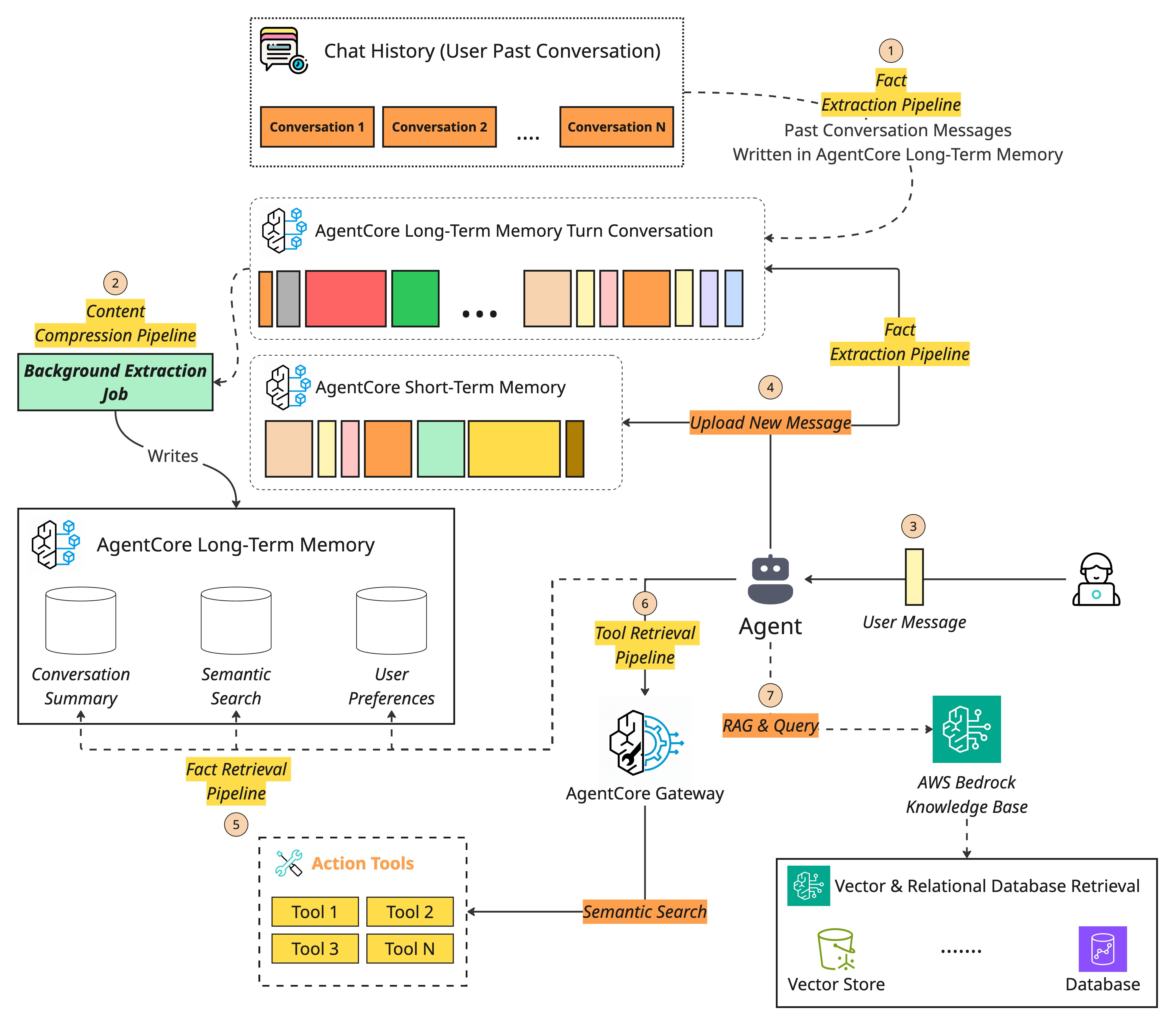
First, the system retrieves the user’s shopping profile from episodic memory — past purchases, saved wishlists, previously stated budget preferences, and any notes from earlier conversations (like the fact that they bought their friend a knife set six months ago, so we shouldn’t recommend the same thing).
With AgentCore Memory, this retrieval happens automatically — session summaries and semantic facts extracted from prior interactions are already structured and ready to query, no custom memory pipeline required.
If the agent needs to check real-time inventory or apply a promo code, it calls external tools through AgentCore Gateway — but only the tools relevant to this specific query get included in the prompt, thanks to semantic tool search. No bloated tool lists, no tool confusion.
Next, it queries a semantic memory layer — the product catalog, current inventory, trending items in the cooking and outdoor categories, active promotions, and customer ratings. This is the RAG layer, powered by a Bedrock Knowledge Base that handles ingestion, chunking, embedding, and retrieval out of the box.
The system then assembles all of this — user context, product knowledge, conversation history, and the original query — into a structured prompt with clear boundaries between each information type. Here’s a simplified version of what that looks like. Pay attention to the structure and ordering — critical instructions anchored up top, retrieved context in the middle, user query at the end:
SYSTEM_PROMPT = """
You are a personal shopping assistant. Your goal is to recommend
thoughtful, personalized gifts based on the recipient's interests,
the user's budget, and available products. Never recommend items
the user has already purchased for this recipient.

<INSTRUCTIONS>
1. Analyze the user's request and all provided context.
2. Use the shopping history to avoid duplicate gifts and understand preferences.
3. Use the product catalog to find relevant, in-stock items within budget.
4. Prioritize highly rated and trending items when multiple options fit.
5. Suggest 2-3 options with a brief reason for each recommendation.
</INSTRUCTIONS>

<USER_PROFILE>
{retrieved_user_profile}
</USER_PROFILE>

<PAST_PURCHASES_FOR_RECIPIENT>
{retrieved_gift_history}
</PAST_PURCHASES_FOR_RECIPIENT>

<PRODUCT_CATALOG>
{retrieved_products}
</PRODUCT_CATALOG>

<TRENDING_AND_PROMOTIONS>
{current_trends_and_deals}
</TRENDING_AND_PROMOTIONS>

<CONVERSATION_HISTORY>
{formatted_chat_history}
</CONVERSATION_HISTORY>

<USER_QUERY>
{user_query}
</USER_QUERY>

Based on all the information above, recommend the best gift options.
"""
Notice how every optimization technique we covered is at work here:
Context selection — only relevant products and history make it into the prompt, filtered by the Knowledge Base’s retrieval and reranking pipeline.
Context compression — older conversation turns are summarized via AgentCore Memory’s session summary strategy, not dumped in verbatim.
Context ordering — instructions at the top, fresh user query at the bottom, retrieved data in between.
Format optimization — XML tags clearly separate each information type so the model knows exactly what it’s looking at.
Tool isolation — AgentCore Gateway ensures only the tools needed for this task appear in the context.
The LLM generates a personalized, budget-aware recommendation grounded in real data — not generic bestseller lists. Finally, the system logs the interaction and writes any new preferences back to long-term memory through AgentCore Memory.
This user shops for gifts frequently, prefers a mid-range budget, and their friend likes cooking and the outdoors. Next time, the agent already knows.
The prompt template itself is clean and well-organized — but the real power isn’t in the template. It’s in the infrastructure around it that dynamically populates every section with the right information at the right moment. Without context engineering, this same agent would just spit out a generic “top 10 gifts for cooking lovers” list. With it — backed by Bedrock Knowledge Bases for retrieval, AgentCore Memory for personalization, and AgentCore Gateway for lean tool management — the agent knows your budget, knows what you’ve already given, knows what’s actually in stock and on sale, and tailors everything accordingly.
That’s the difference between a demo and a production system.
Conclusion
The shift from prompt engineering to context engineering isn’t a trend — it’s the natural consequence of building AI systems that do real work. The moment your agent needs memory, tools, personalization, and domain knowledge to function, the prompt becomes just one moving part in a much larger machine. What actually determines whether your system works in production is what surrounds that prompt: how you retrieve information, how you compress it, how you order it, and how you keep it from going stale.
The challenges are real — context windows are finite and expensive, models lose focus as context grows, outdated facts corrupt your agent’s reasoning, and too many tools create more confusion than capability.
But every one of these problems has a known set of solutions. Select only what’s relevant.
Compress what’s old.
Order what remains deliberately.
Isolate what doesn’t belong together.
Format everything so the model can parse it cleanly.
If there’s one takeaway from this entire post, it’s this: prompt engineering is about what you say to the model. Context engineering is about what the model sees before you say anything. Master that distinction, and you’re building AI systems that don’t just demo well — they hold up when real users show up with real problems.